Data Carving
File Carving
On-Disk Files
Purpose: Extract an individual file that was loaded into memory from the filesystem.
-
Identify File Physical Address: Run
filescanto locate file objects in memory and identify the physical address for the specific file.vol.py -f <image> --profile=<profile> filescan | grep <file_name>Note the physical address (e.g.,
0x0000000006439800) of the target file from the output.
-
Dump File from Memory: Use the identified physical address with
dumpfilesto extract the file.vol.py -f <image> --profile=<profile> dumpfiles -n -F DataSectionObject -Q <physical_address> -D <output_dir>
Vol3 dumpfiles uses the virtual address from filescan output (the Offset column), not the physical address.
# Find the file
vol3 -f <image> windows.filescan | grep <file_name>

# Dump using virtual address from the Offset column
vol3 -f <image> windows.dumpfiles --virtaddr <virtual_address>

# Dump all files matching a pattern
vol3 -f <image> windows.dumpfiles --filter <file_name>
Output is written to the current working directory — run from your output folder or redirect with a path.
Windows Event Log Carving
On-Disk Files
Purpose: Extract Windows Event Log files (.evtx) that were loaded into memory from the filesystem.
-
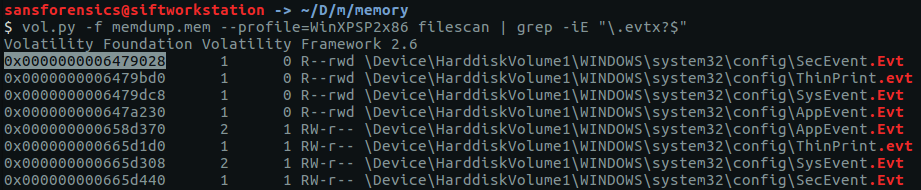
Identify Event Log File Physical Address: Run
filescanto locate event log files in memory.vol.py -f <image> --profile=<profile> filescan | grep -iE "\.evtx?$"Note the physical address of the target file.
-
Dump File from Memory: Use the identified physical address with
dumpfiles.vol.py -f <image> --profile=<profile> dumpfiles -n -F DataSectionObject -Q <physical_address> -D <output_dir>
vol.py -f <image> --profile=<profile> filescan | grep -iE "\.evtx?$" > filescan-evt_files
while read line; do
    vol.py -f <image> --profile=<profile> dumpfiles -n -F DataSectionObject \
        -Q $(echo $line | awk '{print $1}') -D <output_dir>
done < filescan-evt_files
# Dump all .evtx files
vol3 -f <image> windows.dumpfiles --filter ".evtx"
Extracted .evtx files can be opened in Windows Event Viewer, or parsed on Linux with:
python3 -m evtx.evtx_dump <file.evtx> | less
# or
chainsaw search -t "Sigma" --sigma /rules/ <output_dir>/
Process Carving
Process Executable (On-Disk)
Purpose: Extract a process executable file that was loaded into memory from the filesystem. This retrieves the original on-disk binary — useful as a baseline to compare against the in-memory version.
-
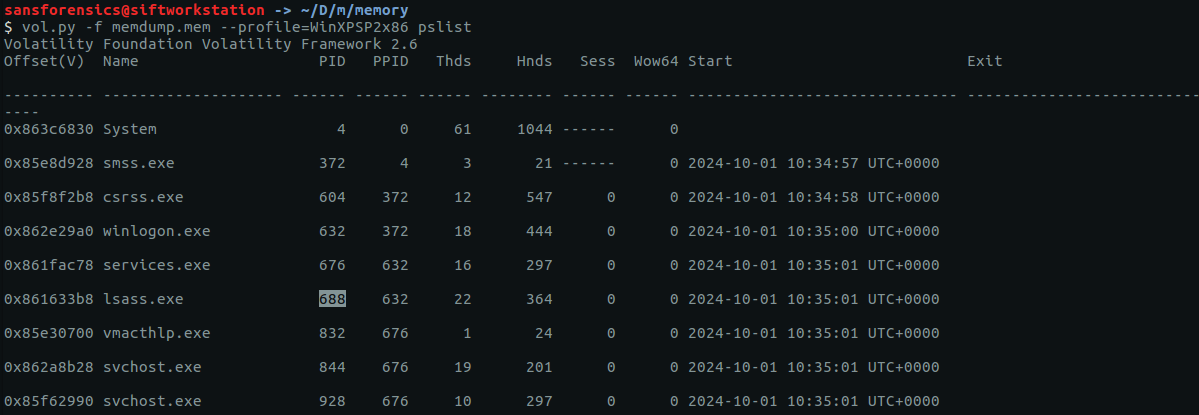
Identify Target Process: Run
pslistandcmdlineto identify the process and its executable path.vol.py -f <image> --profile=<profile> pslist
vol.py -f <image> --profile=<profile> cmdline -p <PID>Note the PID and executable name from the output.

-
Identify File Physical Address: Run
filescanto locate the executable file object in memory.vol.py -f <image> --profile=<profile> filescan | grep <file_name>Note the physical address of the target executable.

-
Dump Process Executable File from Memory:
vol.py -f <image> --profile=<profile> dumpfiles -n -F DataSectionObject -Q <physical_address> -D <output_dir>
vol3 -f <image> windows.filescan | grep <file_name>
vol3 -f <image> windows.dumpfiles --virtaddr <virtual_address>
Process Executable (In-Memory)
Purpose: Extract the in-memory image of a process executable. This may differ from the on-disk version — packed malware unpacks itself in memory, making this the deobfuscated version. procdump reconstructs the PE format from memory, making it suitable for static analysis.
-
Identify Target Process:
vol.py -f <image> --profile=<profile> pslistNote the PID of the target process.
-
Dump the In-Memory PE:
vol.py -f <image> --profile=<profile> procdump -p <PID> -D <output_dir>
vol3 -f <image> windows.procdump --pid <PID>
Output is written to the current working directory as pid.<PID>.0x<addr>.dmp.
After dumping both the on-disk file (dumpfiles) and the in-memory image (procdump), compare their hashes to detect unpacking or patching:
sha256sum /output/executable.on-disk.exe /output/executable.procdump.exe
A mismatch indicates the process image in memory differs from its disk counterpart — common with packed malware, process hollowing, or in-memory patching.
Full Process Memory
Purpose: Extract all memory allocated to a process — heap, stack, loaded DLLs, and executable code. Much larger than procdump. Useful when looking for artifacts that live in the heap (decrypted strings, C2 config, credentials) rather than just the executable image.
-
Identify Target Process:
vol.py -f <image> --profile=<profile> pslist -
Dump Full Process Memory:
vol.py -f <image> --profile=<profile> memdump -p <PID> -D <output_dir>Output:
<PID>.dmp— can be hundreds of MB.
vol3 -f <image> windows.memmap --dump --pid <PID>
Output: pid.<PID>.dmp in the current directory.
# Extract printable strings (minimum length 8)
strings -n 8 /output/<PID>.dmp > /output/<PID>_strings.txt
# Search for URLs, IPs, interesting keywords
grep -iE "(http|ftp|\\\\\\\\|cmd|powershell|password|token)" /output/<PID>_strings.txt
# Search for credentials in lsass memdump with pypykatz (offline Mimikatz)
pypykatz lsa minidump /output/<PID>.dmp
DLL Carving
DLL Image (In-Memory)
Purpose: Extract DLLs loaded by a process — useful for recovering injected or modified DLLs that may differ from their on-disk counterparts.
-
Identify Target Process:
vol.py -f <image> --profile=<profile> pslist
vol.py -f <image> --profile=<profile> cmdline -p <PID>
-
List Loaded DLLs: Identify the target DLL's base address.
vol.py -f <image> --profile=<profile> dlllist -p <PID>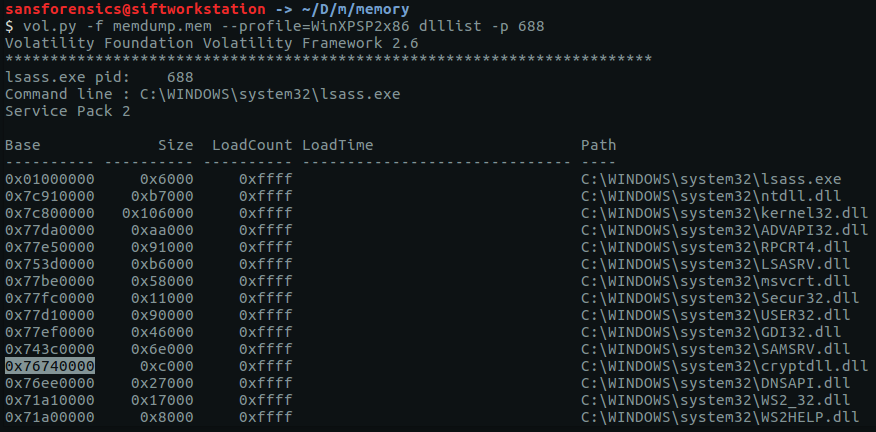
-
Dump DLL from Memory:
# Single DLL by base address
vol.py -f <image> --profile=<profile> dlldump -p <PID> -b <base_address> -D <output_dir>

# All DLLs loaded by the process
vol.py -f <image> --profile=<profile> dlldump -p <PID> -D <output_dir>
# List DLLs
vol3 -f <image> windows.dlllist --pid <PID>

# Dump all DLLs for a PID
vol3 -f <image> windows.dlllist --pid <PID> --dump
Output DLLs are written as pid.<PID>.dll_base.<addr>.dll in the current directory.
Registry Hive Carving
Hive File (On-Disk)
Purpose: Extract registry hive files (SAM, SYSTEM, SECURITY, NTUSER.DAT) that were loaded into memory from the filesystem.
-
Identify Registry File Physical Address:
vol.py -f <image> --profile=<profile> filescan | grep -iE "\\\\(windows\\\\system32\\\\config\\\\(default|sam|security|system)|(ntuser|usrclass)\.dat)$"Note the physical address of the target hive file.
-
Dump Hive File from Memory:
vol.py -f <image> --profile=<profile> dumpfiles -n -F DataSectionObject -Q <physical_address> -D <output_dir>
vol.py -f <image> --profile=<profile> filescan \
    | grep -iE "\\\\(windows\\\\system32\\\\config\\\\(default|sam|security|system)|(ntuser|usrclass)\.dat)$" \
    > filescan-reg_files
while read line; do
    vol.py -f <image> --profile=<profile> dumpfiles -n -F DataSectionObject \
        -Q $(echo $line | awk '{print $1}') -D <output_dir>
done < filescan-reg_files
vol3 -f <image> windows.dumpfiles --filter "(sam|system|security|ntuser|usrclass)"
Once the SAM and SYSTEM hive files are extracted, use impacket-secretsdump offline to extract password hashes without needing a live system:
impacket-secretsdump -sam /output/sam.hive -system /output/system.hive LOCAL
Hive File (In-Memory)
Purpose: Extract registry hives from memory directly using the kernel's in-memory representation — may differ slightly from the on-disk version (uncommitted changes are reflected in memory).
-
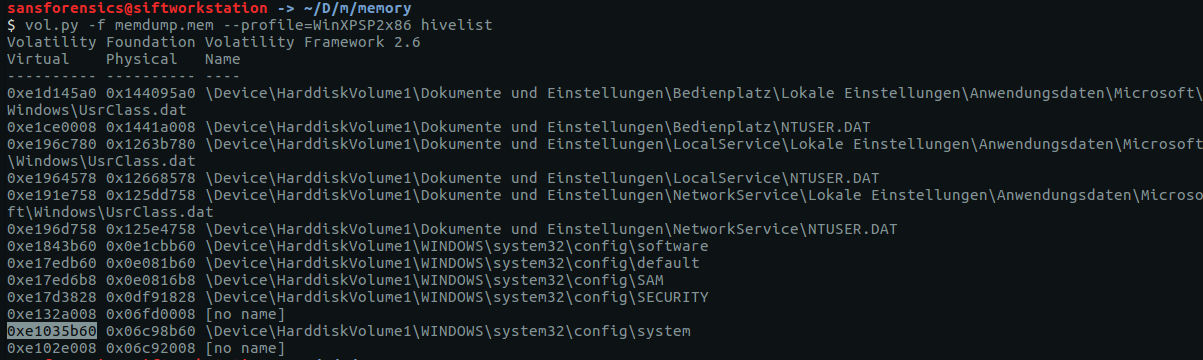
Identify Registry Virtual Address:
vol.py -f <image> --profile=<profile> hivelistNote the virtual address of the target hive.
-
Dump Hive from Memory:
vol.py -f <image> --profile=<profile> dumpregistry -o <virtual_address> -D <output_dir>
# List hives
vol3 -f <image> windows.registry.hivelist

# Dump all hives
vol3 -f <image> windows.registry.hivelist --dump

# Dump specific hive by offset
vol3 -f <image> windows.registry.hivelist --dump --filter <hive_name>